---
title: "Content Tags"
slug: "content-tags"
description: "This page contains all content tags for WineDirect Ecommerce Classic system."
updated: 2024-10-28T22:13:46Z
published: 2024-10-28T22:13:46Z
canonical: "docs.winedirect.com/content-tags"
---
> ## Documentation Index
> Fetch the complete documentation index at: https://docs.winedirect.com/llms.txt
> Use this file to discover all available pages before exploring further.
# Content Tags
## v65:socialMediaLinks
**Description:** A widget allowing clients to update, add, and remove social media links on their website directly through the admin panel under **Settings** > **Website Editor** > **Social Media Links**.
For the Social Media Links widget to appear in the admin panel, it must first be turned on under **Settings** > **Website Settings** > **Content** > **Social Media** > **General** > **Social Media Widget**.
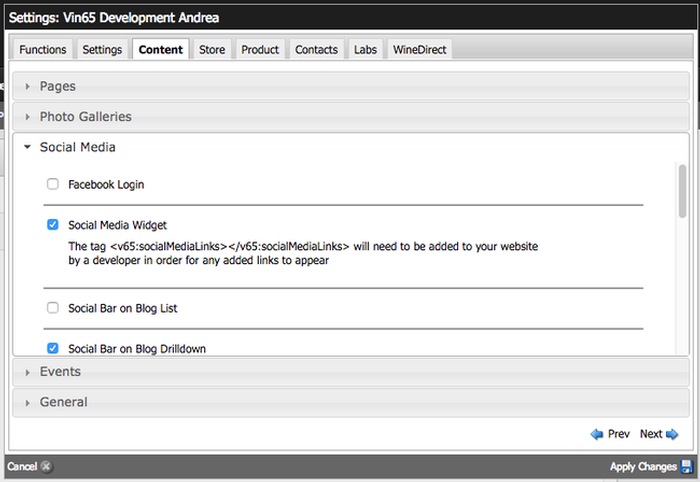
**HTML Source Output:**
```
```
**Base CSS**
While you cannot directly edit the following CSS being applied, you can target any of the following classes and make updates through your own CSS files.
```
ul.v65-socialMediaLinks {
padding: 0;
margin: 0;
}
.v65-socialMediaLinks li {
display: inline-block;
list-style-type: none;
margin-right: 15px;
padding: 0;
}
.v65-socialMediaLinks a {
font-size: 1.5em;
}
```
---
# v65:pods
**Description:** Use this tag to pull a pod location into your template.
**Creating Pod Locations:** Pod locations are created in the website settings under the functions tab. Only users with developer level access can create pod locations. Select from the following options for the pod location.
**Page Tree:** Gives users the ability to apply pods to a specific page. **Allow Adding Pods:** Gives users the ability to add or remove pods. **Allow Free Form Text:** Creates a free form text pod location. **Allow Pod Imag****e:** Creates an image only pod. ( must also specify width and height) **Allow Link:** Links may be applied to pod images, when 'Allow Pod Image' is checked.
**Mandatory Attributes:**
**location:** define the pod location you are calling in
usage:
**Optional Attributes:**
**type:** specify what type of pod elements to display
default: "description" usage:
**randomCount:** randomize the pod and pass in how many to randomly return
default: none usage:
**wrapper:** specify what to wrap your pod in
default: none usage:
**HTML Source Output:**
```
```
**Base CSS from vin65.css:** .v65-podTitle { } .v65-podImage { } .v65-podDescription { }
---
# v65:logo
**Description:** Uses the image uploaded under **Settings** > **Website Editor** > **Header & Footer** > **Logo**.
**HTML Source Output:**
```
```
**Customization**
The logo upload size can be set under **Settings** > **Website Settings** > **Content** > **General** > **Website Width** and **Website Height**. When clients are uploading their logo, the field will automatically generate two images based off of the dimensions set. The dimensions you add will first generate a retina logo, then they will half in size and general a default logo for normal displays.
For example: if you want your image to show on all retina and normal displays at 300px x 200px, please set the image dimensions to 600px x 400px.
**Base CSS**
While you cannot directly edit the following CSS that's being applied, you can target any of the following classes and make updates through your own CSS files.
```
.v65-logo {
background-image: URL HERE;
background-position: center;
background-repeat: no-repeat;
background-size: contain;
height: HEIGHT SET;
position: relative;
width: WIDTH SET;
}
@media (-webkit-min-device-pixel-ratio: 1.5), (min-resolution: 144dpi) {
.v65-logo {
background-image: RETINA URL HERE;
}
}
@media screen and (max-width: 33.75em) {
.v65-logo {
margin: 5em auto 2em;
min-height: auto;
width: 100%;
}
}
.hideText {
overflow: hidden;
text-indent: 100%;
white-space: nowrap;
}
.hideText a {
display: block;
height: 100%;
}
```
---
# v65:pageTitle
**Description:** Outputs the title of the current page.
**HTML Source Output:**
```
Page Title
```
---
# v65:mainContent
**Description:** Outputs the content of the current page.
**HTML Source Output:**
```
Aenean mi erat, vehicula nec dapibus sit amet. Proin sit amet arcu ipsum.
```
---
# v65:contentBlock
**Description:** Use this tag to display the items in a Content Block group.
---
# v65:shippingWidget
**Description:** Used to display basic shipping information to a customer for a given state.
**Optional Attributes:**
**maxRows:** specify what type of pod elements to display
default: 5 usage:
**stateCode:** set the default state
default: "CA" usage:
**shippingStrategyID****:** specify which shipping strategy to use if there is more than one
default: is the default shipping strategy usage:
**shippingTypeID****:** specify which shipping strategy to use if there is more than one
default: is the first shipping type in the default shipping strategy usage:
**Html Output:**
```
```
**Base CSS from vin65.css:**
/*Shipping Widget*/ #v65-shippingWidget { padding: 0px 20px; } #v65-shippingWidget select { width: 60px; } #v65-shippingWidgetTable { width: 100%; } #v65-shippingWidgetTable th { background-color: #666; color: #fff; font-size: 0.917em; padding: 4px; } #v65-shippingWidgetTable td { color: #000; font-size: 0.917em; padding: 4px; }
---
# v65:promoGroup
**Description:** This tag is used to display products outside of the store area on a site. (ie. like the homepage).
**NOTE:** this tag now has better alternatives such as Product Groups that are available if Products V3 is turned on.
**Mandatory Attributes:**
**category****:** set the product category to display using the keyword of the page which is found in the Admin tab of the Page Properties
default: NA usage:
**promoGroupElements****:** which items to show from the page before the products are displayed
default: NA usage:
**productElements****:** specify which product elements to show and in which order.
default: NA usage:
**Optional Attributes:**
**maxRows:** specify how many to display
default: all usage:
**Html Output:**
```
Red Products
```
**Base CSS from vin65.css:**
.v65-promoGroupProduct .v65-promoGroupProductTitle .v65-promoGroupProductThumbnail .v65-promoGroupProductPhoto .v65-promoGroupProductSKU .v65-promoGroupProductVintage .v65-promoGroupPrice .v65-promoGroupProductTeaser .v65-promoGroupProductActionMessage .v65-promoGroupProductCustomerRatings .v65-promoGroup-RPRating .v65-promoGroup-WSRating .v65-promoGroup-WERating .v65-promoGroup-CGRating .v65-promoGroup-JHRating .v65-promoGroup-STRating .v65-promoGroup-WNRating .v65-promoGroup-WAndSRating .v65-promoGroup-WARating .v65-promoGroup-WBRating .v65-promoGroupAddToCart
---
# v65:subscribe
**Description:** Creates a simple form with an email field and a subscribe button. Subscribers are place by default into a Contact Type called "Newsletter" which must exist. You can alternatively create a different Contact Type and pass that in the tag.
**Output:**
```
```
**Customization:**
1. To customize the button text and thank you text you need to edit the resource bundle: The elements you want to adjust are "subscribe" and "subscribeThankYouText"
3. Styling the form elements: You can both the form field and the button by targeting the following IDs: #v65-subscribeWidget input { } #v65-subscribeWidget button { }
---
# v65:siteLogin
**Description:** Use this tag to force someone to login before entering your site.
**Required Attributes:**
**signUpPageID:** specify which page content to pull into modal to customize messaging. This must be specified in order for the tag to work. Add the keyword of "siteLogin" to this page in the Content Editor under Page Properties > Admin > Keyword.
default: none usage:
**IPAddressOverride:** specify a list of IP Addresses that will override the login security by bypassing the login modal. Note: Multiple IDs must be separated by a comma with no spaces.
usage:
---
# v65:twitterFeed
**Description:** Use this tag to pull a twitter feed onto your site.
**Mandatory Attributes:**
**searchQuery:** define the search parameters for the feed
usage: For a list of all search operators that you can put into the twitter searchQuery visit twitter's API page: [https://dev.twitter.com/docs/using-search](https://dev.twitter.com/docs/using-search) To test your search on twitter go to: [https://twitter.com/#!/search-home](https://twitter.com/#!/search-home)
**Optional Attributes:**
**maxRows:** how many items to display
default: 2 usage:
**HTML Source Output:**
```
```
**Base CSS from vin65.css:** .v65-tweet { } .v65-tweetProfileImage { } .v65-tweetText { } .v65-tweetDetails { }
---
# v65:birthDateValidation
**Description:** Asks the visitor to confirm that they are old enough to enter the site by specifying their birthdate. Content is pulled for the age gate tag from a page in the admin panel with a keyword of "BirthDateValidation"
**HTML Source Output:**
```
```
**Base CSS from vin65.css:** #v65-modalContainer #v65-modalViel #v65-modalAgeVerification #v65-modalContent .v65-ageGate-yes .v65-ageGate-no
**Resource Bundle Elements:** Month Day Year
---
# v65:eventToday
**Description:** Outputs events for today and allows you to move back and forth using a block style calendar.
**Options:**
**hasCalendar:** adds a block style calendar to move months
default="0" usage:
**calendar:** by default the widget shows events from all calendars but set the calendar to specify a single calendar.
default="" usage:
**showWithNoEvents:** shows even if there are no events
default="1" usage:
**HTML Output:**
```
Friday July 13, 2012
Today's Schedule
| S |
M |
T |
W |
T |
F |
S |
| 1 |
2 |
3 |
4 |
5 |
6 |
7 |
| 8 |
9 |
10 |
11 |
12 |
13 |
14 |
| 15 |
16 |
17 |
18 |
19 |
20 |
21 |
| 22 |
23 |
24 |
25 |
26 |
27 |
28 |
| 29 |
30 |
31 |
1 |
2 |
3 |
4 |
```
**CSS Styles:**
```
/* -----Event Today----- */
.v65-event-today { text-align: center; }
.v65-event-date { }
.v65-event-title { font-weight: bold; margin-bottom: 1em; }
.v65-event-events { }
.v65-event-events-event { margin-bottom: 1em; }
.v65-event-events-event-time { display: inline-block; margin-right: 5px; }
.v65-event-events-event-title { display: inline-block; }
/* -----Event Today With Calendar----- */
.v65-event-calendar { margin-bottom: 1em; }
.v65-event-calendar-nav { font-weight: bold; text-align: center; }
.v65-event-calendar-nav-title { }
.v65-event-calendar table { border-top: 1px solid #999; border-right: 1px solid #999; width: 100%; margin: 0 auto; font-size: 0.897em; }
.v65-event-calendar th { border-bottom: 1px solid #999; border-left: 1px solid #999; padding: 1px; font-weight: bold; text-align: center; padding: 0; color: #fff; background-color: #666; }
.v65-event-calendar td { border-bottom: 1px solid #999; border-left: 1px solid #999; padding: 1px; text-align: center; width: 14%; }
.v65-event-calendar .v65-CalendarDay { float: right; width: 15px; height: 15px; padding: 0 2px 2px 2px; border-left: 1px solid #999; border-bottom: 1px solid #999; text-align:right; font-size: 0.917em; color:#869fc3; clear: both; }
.v65-event-calendar .v65-CalendarToDay { background-color: #ccc; }
.v65-event-calendar .v65-CalendarOffMonthDays { background-color: #eee; }
.v65-event-calendar .v65-CalendarEvent { clear: both; padding: 0px 0px 8px 0px; font-size: 0.917em; }
.v65-event-calendar .v65-CalendarEvent a { }
```
---
# v65:eventUpcoming
**Description:** Outputs upcoming events in a widget on any page.
**Options:**
**eventCount:** specifies the amount of events to show
default="5" usage:
**calendar:** by default the widget shows events from all calendars but set the calendar to specify a single calendar.
default="" usage:
**showWithNoEvents:** shows even if there are no events
default="1" usage:
**HTML Output:**
```
Upcoming Events
Jul 12, 2012
1:00 PM - 2:00 PM
```
**CSS Styles:**
```
.v65-event-upcoming { text-align: center; }
.v65-event-upcoming-title { font-size: 1.2em; font-weight: bold; }
.v65-event-upcoming-event { margin-bottom: 1em; }
.v65-event-upcoming-event-date { font-weight: bold; }
.v65-event-upcoming-event-time { display: inline-block; margin-right: 5px; }
.v65-event-upcoming-event-title { display: inline-block; }
```
**Resource Bundle Elements:** UpcomingEvents


